Lost Your TV Remote Here Is How To Turn Your Android Phone Into A Remote
A missing TV remote does not always mean buying a replacement, as compatible Android phones and tablets can control smart TVs through apps or infrared accessories.

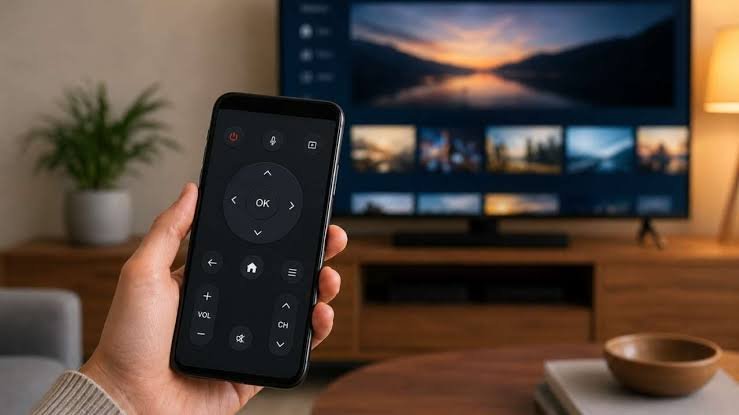
Losing the television remote can be frustrating, especially when you need to change the channel, adjust the volume or open another app. But buying a new remote may not be necessary in every case. If you have an Android smartphone or tablet, it can potentially be used as a TV remote.
The easiest option is to use the official mobile application supported by the television brand or its platform. Many smart TVs can communicate with smartphones through the same WiFi network. Once the devices are connected and paired, the phone can perform several functions normally handled by a physical remote.
The setup, however, is not identical for every television. It depends on the TV manufacturer and the operating system running on the device. Roku devices and compatible TVs, for example, can be controlled through the Roku application. Samsung televisions can be connected using SmartThings, while Amazon Fire TV devices have their own remote control application.
Google TV also provides mobile control features for compatible devices. If a particular television does not have a dedicated manufacturer application, users may find compatible third party remote applications through Google Play. Compatibility should be checked before installing or relying on any such application.
Getting an Android phone ready for TV control is fairly simple when both devices support the feature. First, connect the smartphone and television to the same WiFi network. Next, open the compatible remote application and follow the pairing instructions shown on the screen.
After the connection is established, the phone can be used for common controls. Depending on the TV and application, users can change channels, adjust the volume, navigate menus and operate different parts of the television interface.
There are situations where WiFi is not the only option. Some televisions and remote applications can also support Bluetooth connections. In such cases, the smartphone can communicate directly with the TV over Bluetooth. However, this depends on whether both the television and the selected application support the required connection method.
For people whose television does not offer suitable wireless control, an infrared option can be considered. A USB Type C IR blaster can turn a compatible Android phone into something closer to a traditional infrared remote.
An IR blaster is a small accessory that connects to the phone’s USB Type C port and sends infrared signals to supported electronic devices. Unlike WiFi based control, this method does not require the phone and television to be connected to the same network. The accessory sends commands directly toward the infrared receiver on the television.
USB Type C IR blasters are available from various retailers and can work with compatible remote control applications. Depending on the accessory and application, some can also operate other infrared enabled devices such as media players and air conditioners.
The choice between these methods largely depends on the equipment already available at home. WiFi based control is convenient when both the TV and phone support it and does not require additional hardware. Bluetooth can be useful on compatible devices, while an IR blaster provides another option when network based control is unavailable.
It is also worth checking the television manufacturer’s official application before installing an unknown remote application. Official apps are generally designed specifically for supported TV models and can offer a more straightforward setup.
A smartphone cannot replace every physical remote in every situation, but for many compatible smart TVs it can be a practical backup. So, if the original remote has disappeared, checking your Android phone first could save you the trouble and expense of immediately buying another one.