Best Budget Laptops for Students and Coding in 2026
Affordable laptops with fast processors, long battery life, reliable performance, and modern features are helping students handle coding, assignments, online classes, and multitasking without stretching their budgets too much today.

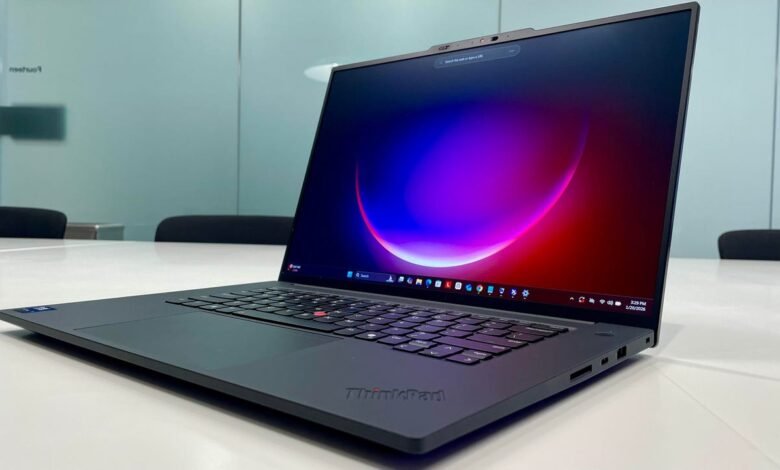
Finding a laptop that balances performance, battery life, and affordability has become one of the biggest priorities for students. Whether it is coding, preparing presentations, attending online classes, or working on college projects, a dependable machine can make daily tasks much easier. Fortunately, several budget friendly laptops now offer features that were once limited to premium devices.
For students pursuing programming, software development, or engineering courses, performance is often the deciding factor. Modern laptops equipped with Intel Core i5, Intel Core Ultra, or AMD Ryzen processors can comfortably handle coding environments, multiple browser tabs, and development tools. Paired with SSD storage and sufficient RAM, these devices deliver faster boot times and smoother multitasking.
Among the standout options is the ASUS Vivobook S16, a sleek and lightweight laptop designed for students and professionals who need reliable performance. Powered by the latest Intel Core Ultra processor and AI focused capabilities, it offers smooth productivity, a premium design, and an impressive OLED display. The laptop also includes productivity software and strong battery life, making it a well rounded choice for users who want modern features.
Students looking for a budget conscious option may find the Acer Aspire One attractive. Despite its affordable pricing, it offers a practical combination of memory, portability, and everyday performance. Its lightweight design makes it easy to carry across campuses, while bundled software support adds extra value for students.

The Lenovo V15 G4 is another practical choice for learners who need a larger display and dependable performance for everyday work. Equipped with fast SSD storage and modern connectivity features, it is suitable for browsing, document creation, research work, and online learning. Its Full HD anti glare screen also helps reduce eye strain during long study sessions.
For those who regularly work on demanding projects, the HP 15 delivers stronger performance with a Ryzen 5 processor and generous memory configuration. It is designed to handle coding workloads, office applications, and multitasking more comfortably than entry level devices. Additional features such as a backlit keyboard and high quality webcam make it useful for virtual classes and meetings.
Dell also remains a popular choice among students. The Dell 15 Smart Choice model combines a powerful 13th generation Intel Core i5 processor with ample RAM and large SSD storage. Its smooth display and strong overall performance make it suitable for users who need a laptop capable of managing heavier academic workloads without slowing down.
At the entry level end of the market, the Neopticon BrowseBook 14.1 caters to users with very limited budgets. It is designed primarily for web browsing, online classes, document editing, and basic computing tasks. While it is not intended for intensive programming or professional workloads, it offers an affordable starting point for students entering the digital learning environment.
Another compact option is the HP 14s, which focuses on portability and daily productivity. With SSD storage and a lightweight build, it serves students who need a simple device for assignments, browsing, and virtual learning sessions.
Experts suggest that students should choose laptops according to their field of study rather than focusing solely on price. For general academic use, a system with an Intel Core i3 or AMD Ryzen 3 processor, 8GB RAM, and 512GB SSD is usually sufficient. However, coding and software development students are better served by laptops featuring Intel Core i5 or AMD Ryzen 5 processors paired with at least 16GB RAM and SSD storage.
Creative students working with graphic design, video editing, or 3D applications may require even more powerful hardware, including dedicated graphics cards. Such users should prioritize processing power and graphics performance over basic affordability.
When shopping for a laptop, several factors deserve attention. A modern processor, SSD storage, Full HD anti glare display, strong battery life, and adequate RAM should be considered essential. Buyers should also check whether the laptop includes Windows 11 and productivity software, which can save additional costs later.
Industry observers note that laptops offering a combination of Core i5 or Ryzen 5 processors, 16GB memory, and SSD storage are likely to remain capable for several years. This makes them a smarter long term investment for students who want a device that can handle future software updates and growing academic demands.
As educational requirements continue to evolve, budget laptops are becoming more powerful and feature rich. Students no longer need to spend a fortune to get reliable performance, long battery life, and a smooth learning experience. With the right choice, a laptop can remain a valuable companion throughout college and beyond.